
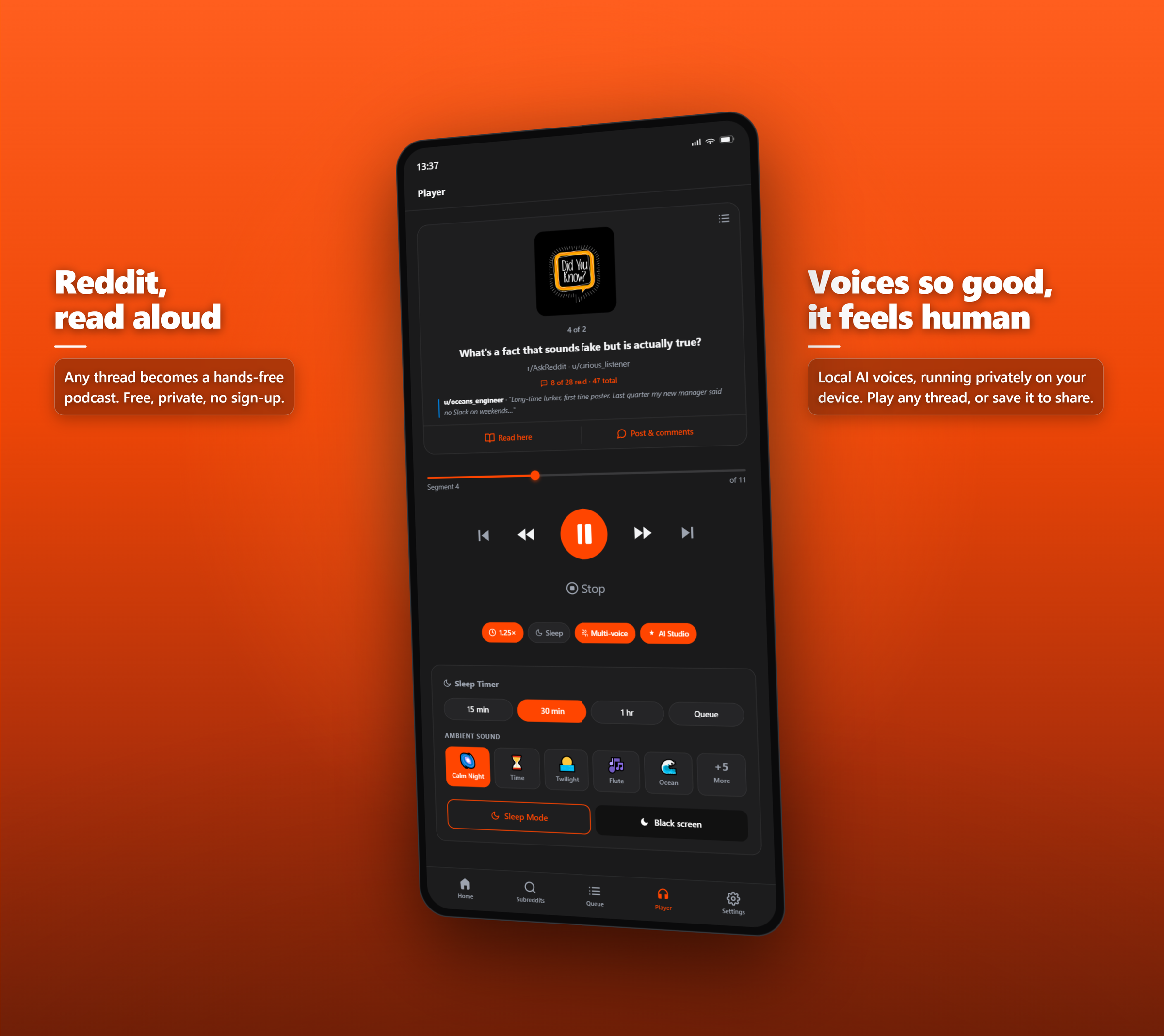
What's a fact that sounds fake but is actually true?
Discussion
I'll start: octopuses have nine brains — one central and one in each arm.
▲ 4.2k 💬 892 u/curious_listener

Threads, now a podcast.
Wait until you hear about their blue blood — copper-based hemocyanin instead of iron.
OP here — so it literally bleeds blue? That sounds made up.
Bright blue when oxygenated — hemocyanin just carries oxygen with copper instead of iron.
And they can taste with their suckers. Evolution went absolutely wild on cephalopods.
Taste AND touch with the same suckers feels like a cheat code.
About 10,000 chemoreceptors per sucker — they basically see flavour.
Three hearts too. Two pump blood to the gills, one to the rest of the body.
They edit their own RNA on the fly to adapt to cold water — basically rewriting their own code in real time.
Built for your phone first, and right in your browser when you're at your desk.
The full ThreadCast: author-aware narration, a podcast-style queue, lock-screen and Bluetooth controls, and sleep mode. AI neural voices and MP3 export arrive with Premium.
Get on Google PlayListen to any thread right where you browse. One click on a post and threads read themselves. Free, no account.
Add to ChromeFrom thread to playback in three taps, on your phone or in your browser.
Any subreddit, any post, at your desk or on your phone. Nothing to copy or paste.
Tap to queue the post and its comments. We give each author their own voice and read it aloud.
Follow along, switch voices, queue more threads, or drift into sleep mode with ambient audio.
Multi-voice narration
ThreadCast gives the original poster and each commenter a distinct, consistent voice, so a 200-reply thread plays back like a real conversation between people. Long threads finally make sense by ear.
r/AskReddit
Found an app that reads Reddit threads out loud. Honestly saved my commute.
u/Sarah · multi-voice narration
Post u/Sarah Found an app that reads Reddit threads out loud. Honestly saved my commute.
3 comments + replies
3 of 3 selected for playback
Why ThreadCast
Everything that matters happens on your device.
Nothing leaves your device. No account, no tracking, no servers in the loop.
On-device neural voices, far past your phone's system voices. They download once, then run with no cloud and no streaming.
Save a thread as an MP3 and play it in any podcast app. On Android Premium now (v1.2); coming to the extension.
Synthesis runs locally, so the voices and audio never touch a server. Optional sync covers only your queue and preferences.
Queued posts and their comments cache on your phone, so playback keeps going on the subway, the plane, or anywhere with no signal.
Built to be heard. The Android app ships full TalkBack support, so the whole app is navigable by screen reader.
On-device AI voices
Choose a neural engine tier, from light and fast to studio quality, then browse and preview the on-device voices. Everything synthesizes locally, so they keep working with no account, no cloud, and no signal.
Take it with you
Export a thread to a clean MP3 with chapter marks and cover art, then drop it into any podcast app, send it to a friend, or keep it for the flight.
On Android Premium now (v1.2). Coming to the extension.
When it's time to wind down, slow the narration over a soundscape, set a timer, and let it fade to silence on a black screen. Pick from ten ambient backdrops or add your own, all on-device.
Ten ambient soundscapes, plus your own. Free on every ThreadCast.
No. ThreadCast is an independent reader built by Pixel Labs. "Reddit" is a registered trademark of Reddit, Inc.
No. The extension reads what's already on the page. It never logs in or accesses your account.
Four on-device options on the Chrome extension. The default uses your browser's built-in speech engine (Web Speech API). For higher quality you can opt into the AI Neural CPU engine, the AI Neural GPU Lite engine, or the full AI Neural GPU engine with 11 voices. They download once, then run fully offline. No audio is ever sent to a server. The Android app uses your phone's system voices today; AI neural voices on mobile are available with Premium.
Three optional neural upgrades over your OS voices on the Chrome extension: AI Neural CPU (five hand-picked English voices), AI Neural GPU Lite (a lighter GPU engine), and the full AI Neural GPU (eleven voices and accents). Each downloads once and stays cached until you uninstall the extension. On Android, locally-rendered AI neural voices are available with ThreadCast Premium.
We hash the username and map it to a voice, so the same user always gets the same voice across threads.
Yes. The Android app brings the full experience to your phone: author-aware narration, sleep mode, queue, and lock-screen and Bluetooth controls. iOS is on the way.
Yes. The Android app ships full TalkBack support, so the whole app is navigable by screen reader, and narration is the entire point. Every control is labeled.
The Chrome extension is free. Four voice engines (System, AI Neural CPU, AI Neural GPU Lite, AI Neural GPU), full multi-voice, sleep mode, queue. The Android app has a free tier with System voices, author-aware narration, sleep mode, queue, and lock-screen controls; AI neural voices on Android are available with ThreadCast Premium. One Premium subscription covers both mobile surfaces.
Download the Android app on Google Play, or add it to Chrome free in seconds. No account, no tracking, no catch.

Wait until you hear about their blue blood — copper-based hemocyanin instead of iron.
OP here — so it literally bleeds blue? That sounds made up.
Bright blue when oxygenated — hemocyanin just carries oxygen with copper instead of iron.
And they can taste with their suckers. Evolution went absolutely wild on cephalopods.
Taste AND touch with the same suckers feels like a cheat code.
About 10,000 chemoreceptors per sucker — they basically see flavour.
Three hearts too. Two pump blood to the gills, one to the rest of the body.
They edit their own RNA on the fly to adapt to cold water — basically rewriting their own code in real time.