Engineering
ThreadCast voice engines: 4 on-device options compared
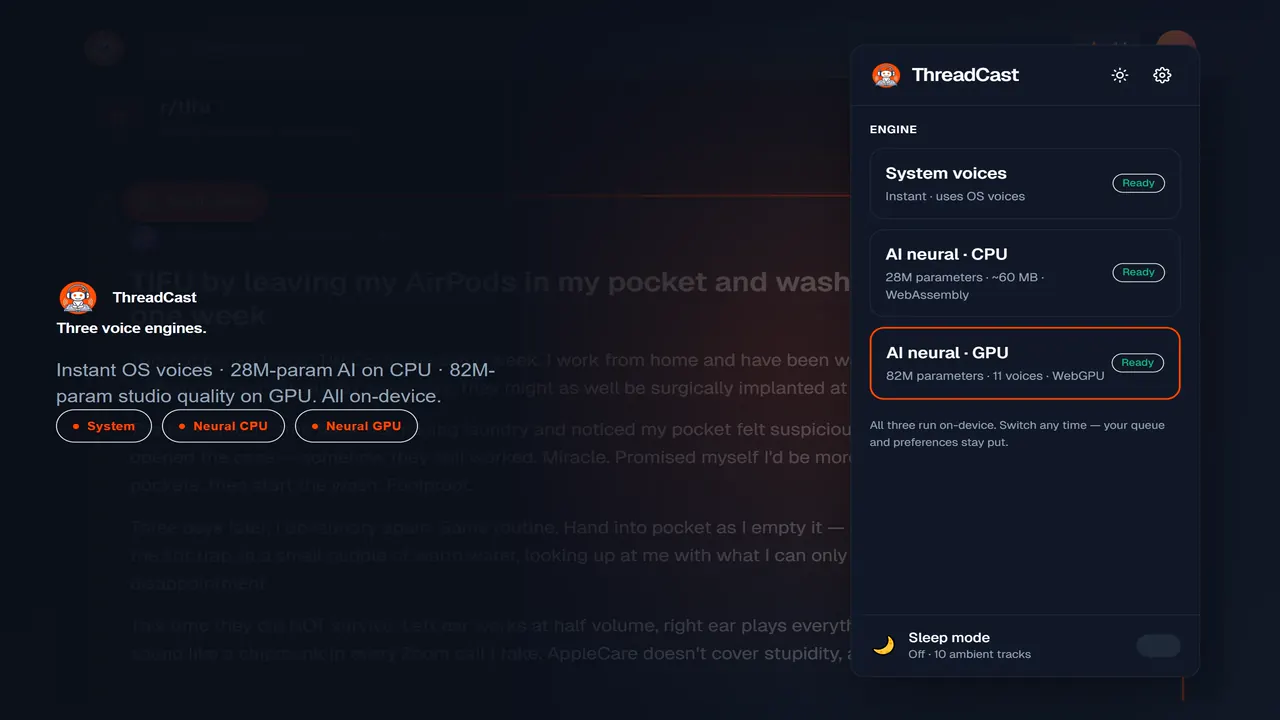
Most browser text-to-speech extensions ship one engine and call it done. ThreadCast ships four. They sound different, run on different hardware, take up different amounts of disk, and serve different listening sessions. You switch between them from the popup at any time, even mid-thread.
TL;DR. ThreadCast has four voice engines. System (instant, free, every device, OS-quality). AI neural CPU (~63 MB per voice, studio-grade English on any laptop). AI neural GPU Lite (~177 MB once for 5 English accents, GPU quality with a lighter install). AI neural GPU (~325 MB once for 11 voices, near-real-time on a modern GPU). All four run fully on your device. No cloud TTS, no subscription required for any of them.
Why ship four voice engines?
Because the right engine depends on the listener and the device, and no single engine fits every case. In 2025, web.dev reported that WebGPU is now supported in all four major browsers, yet some integrated GPUs still hang under heavy neural workloads, so a GPU-only product would lock those users out. A three-hour drive needs a different engine than a 30-second meme thread, and a 2018 ChromeBook cannot run what a 2024 gaming laptop can. Forcing one engine on everyone means either bloating the install for people who do not need it, or starving the people who do.
The other reason is resilience. AI neural engines are great when they work, but GPU support still varies by driver. The same November 2025 web.dev report notes WebGPU runs by default across Chrome, Edge, Firefox, and Safari, yet driver-level hangs persist on older integrated chips. System voices have shipped in browsers for over a decade via the Web Speech API and work everywhere. If the GPU engine flakes on your driver, you fall back without ever hitting a paywall.
The two GPU tiers exist for the same reason. AI neural GPU Lite is a lighter install with quality close behind the full engine, so people on capable GPUs who do not want a larger download still get GPU-quality speech.
What is the actual difference?
The four engines split along hardware: System uses your OS, AI neural CPU runs on WebAssembly, and both GPU tiers run on WebGPU. That GPU path is now broadly available. In 2026, StatCounter measured Chrome at 74.93% of desktop browsers worldwide, and ThreadCast runs on every Chromium browser. Every engine synthesizes locally, so nothing you read leaves the machine (more on that in our on-device privacy guide).
| System voices | AI neural CPU | AI neural GPU Lite | AI neural GPU | |
|---|---|---|---|---|
| Engine | OS Web Speech API | Open-source ONNX neural model | Open-source ONNX neural model | Open-source ONNX neural model |
| Model size | n/a | ~28M parameters | ~52M parameters | ~82M parameters |
| Runs on | OS speech synthesizer | WebAssembly on CPU | WebGPU | WebGPU |
| Disk | 0 MB | ~63 MB per voice | ~177 MB total (one-time, 5 accents) | ~325 MB total (one-time, 11 voices) |
| Time to first sound | Instant | <1 s after warm-up | <1 s after model load | <1 s after model load |
| Synthesis speed | Real-time on any device | ~1× real-time on a modern CPU | Faster than real-time on a modern GPU | ~10× real-time on a modern GPU |
| Quality | Varies by OS (decent to great) | Studio-grade English, warm | GPU quality, close behind the full engine | Studio-grade, more expressive |
| Voices available | Dozens, OS-dependent | 5 hand-picked (EN) | 5 English accents | 11 (EN: 4 British, 2 American male, 5 American female) |
| Languages | All your OS languages | English | English | English (other languages on roadmap) |
| Network needed | Never | Once, for ~63 MB download per voice | Once, for ~177 MB download (all 5 accents) | Once, for ~325 MB download for all 11 voices |
| Best for | Quick listens, French content, low-end laptops | Long sessions on a laptop without a discrete GPU | GPU quality with a lighter install | Best quality, fast playback, modern GPU |
Quality and speed climb as you move right across the columns. Disk usage and “did it download yet” complexity climb too. Pick the leftmost one that is good enough for what you are doing.
How do System voices work?
System voices use the Web Speech API, which is the browser’s bridge to your operating system’s built-in speech synthesizer. macOS has the best stock voices (Samantha, Daniel, Karen are all decent). Windows ships Microsoft David and Zira plus the newer Microsoft Aria neural voice. Linux desktops vary. Usually espeak or festival, which sound robotic but work everywhere.
Pros: zero download, zero CPU cost, instant first audio, every language your OS knows. Cons: quality is whatever your OS gave you, and it varies a lot.
Use System voices when:
- You are on a low-spec laptop or ChromeBook
- You want to listen in French (or any non-English language)
- You are on a borrowed machine and do not want to download anything
- You want playback to start in the same beat as the click
How does AI neural CPU work?
AI neural CPU runs a ~28M-parameter open-source neural TTS model in WebAssembly on the main CPU. Synthesis is roughly real-time on a modern laptop. A 5-second sentence takes about 5 seconds to generate, plus a small warm-up cost the first time you hit play. ThreadCast pre-renders the next segment in the background, so once you are 30 seconds into a thread you do not notice the latency.
Each voice is a separate ~63 MB ONNX file, run via ONNX Runtime Web. We ship 5 hand-picked English voices selected from an open-source model zoo for sounding warm and human, not robotic-good. The first time you click “AI neural CPU” in the popup, ThreadCast prompts to download whichever voice you have selected. Click confirm, and a progress bar shows the per-file download. Once it lands in browser storage, it never re-downloads.
Use AI neural CPU when:
- You want better-than-OS quality but do not have a modern GPU
- You are on a laptop that gets warm (CPU stays under control; no shader compilation)
- You are listening at 1× and do not need the GPU’s headroom
- WebGPU has issues with your driver (rare but real)
How does AI neural GPU Lite work?
AI neural GPU Lite runs a ~52M-parameter open-source neural TTS model on WebGPU, the same GPU path the full engine uses. The whole model downloads once at ~177 MB and covers 5 English accents. Quality sits close behind the full GPU engine, so you get GPU-grade speech without the larger install.
Lite exists for a specific user: someone with a capable GPU who does not want to commit 325 MB of disk to voices they may rarely switch between. The 5 accents cover the common British and American casting most listeners reach for. Because it shares the WebGPU runtime with the full engine, synthesis is faster than real-time, so skip and scrub feel instant once the model has loaded.
Use AI neural GPU Lite when:
- You have a working WebGPU setup but want a smaller download than the full GPU tier
- You want GPU-quality speech and 5 English accents is enough variety
- You are tight on disk but still want better-than-CPU expressiveness
- You plan to upgrade to the full AI neural GPU later and want to start light
How does AI neural GPU work?
AI neural GPU runs an ~82M-parameter open-source neural TTS model on WebGPU. WebGPU lets the browser hand neural workloads off to your graphics card the way games do, defined in the W3C WebGPU specification. On a modern integrated GPU (Apple silicon, recent Intel, recent AMD) and on every discrete GPU we have tested, synthesis runs at roughly 10× real-time. A 10-second sentence takes about a second to generate.
The model and the 11 voice embeddings are downloaded once, ~325 MB total, then cached for life. After that, the engine runs fully offline forever. The 11 voices include four British (two female, two male), two American male, and five American female. A wider casting bench than the CPU engine.
Use AI neural GPU when:
- You have a modern GPU and want the best quality
- You are going to listen for hours, including overnight with sleep mode
- You are using high playback speeds (1.5×+) where pre-rendering helps
- You want the widest voice variety, especially for multi-voice threads
What if my GPU is not supported?
You fall back to a non-GPU engine and keep listening, with no paywall. WebGPU shipped by default across Chrome, Edge, Firefox, and Safari as of November 2025 (web.dev, 2025), but driver-level issues still exist. Some integrated GPUs and older drivers hang under heavy neural workloads. If you click play and synthesis stalls, switch to AI neural CPU (also studio-grade, just slower) or System voices, both of which work on every device. The popup shows an engine status. If it says “WebGPU not available” the AI neural GPU Lite and AI neural GPU cards are greyed out and you cannot accidentally pick a broken engine.
You can confirm WebGPU support yourself at chrome://gpu in Chrome. Look for “WebGPU: Hardware accelerated.”
Can I switch engines mid-thread?
Yes, anywhere, no penalty. Pause, open the popup, pick another engine, hit play. ThreadCast finishes the current segment with the new engine and continues. The author-to-voice mapping stays consistent within an engine (same u/foo always maps to the same voice within System voices, with separate but consistent mapping in each AI neural engine).
This is the main reason we built four engines instead of one: nothing in the listening session breaks if you change your mind. Start a thread on the train with System voices, jump to AI neural GPU Lite when you get to your desk, finish on AI neural CPU when you move to the couch.
Which engine should I pick first?
Start with AI neural CPU if you have a modern laptop, because it lifts quality well above System for a one-time ~63 MB download and runs predictably without a GPU. Match the other three engines to your hardware and your patience from there.
Default to AI neural CPU if you have a modern laptop and you are going to listen for more than ten minutes. Quality is a real step up from System, the download cost (~63 MB for one voice) is a one-time hit, and CPU runtime is more predictable than GPU.
Pick AI neural GPU Lite if you have working WebGPU but want a smaller install than the full GPU tier. The ~177 MB one-time download buys you GPU-quality speech across 5 English accents, with quality close behind the full engine.
Pick AI neural GPU if you already have a Chromium browser with working WebGPU and you want the best ThreadCast can sound. Front-load the ~325 MB download, then enjoy near-instant synthesis from cache.
Stay on System voices if you want to listen right now without downloading anything, you are on a low-spec or shared machine, or you are listening in a language other than English.
You are not picking once. You can switch any time, and ThreadCast remembers your choice per device. All four engines are free in the extension; on the Android app the AI voices ship with Premium (see ThreadCast pricing and the Voices and engines support guide for the current breakdown).
Sources
- web.dev (Google), “WebGPU is now supported in major browsers” (2025). web.dev. Retrieved 2026-06-05.
- StatCounter GlobalStats, “Desktop Browser Market Share Worldwide” (2026). gs.statcounter.com. Retrieved 2026-06-05.
- MDN Web Docs, “Web Speech API” (2026). developer.mozilla.org. Retrieved 2026-06-05.
- W3C, “WebGPU” (2026). w3.org. Retrieved 2026-06-05.
Four engines, one extension, no subscription required for any of them. Open the popup, pick the one that fits your hardware and your patience, and go.
Frequently asked questions
Does it cost more to use the AI neural engines?
Not in the Chrome extension. All four engines (System, AI neural CPU, AI neural GPU Lite, AI neural GPU) are free there. On the Android app, AI neural voices arrive with ThreadCast Premium; the free mobile tier covers System voices, author-aware narration, sleep mode, and queue. iOS is planned.
Where are the model files cached?
In your browser's Cache Storage and IndexedDB, scoped to the extension. They survive browser restarts and updates. If you uninstall ThreadCast, Chrome wipes them automatically. To manually clear, see the Voices and engines section of our support center.
Can I bring my own voice clone?
Not in v1. ONNX voice imports are on the roadmap but constrained to whatever the engine architecture supports.
What is AI neural GPU Lite and how is it different from AI neural GPU?
AI neural GPU Lite is a ~52M-parameter model with a ~177 MB one-time download covering 5 English accents. It runs on WebGPU like the full GPU engine but installs lighter, with quality close behind. The full AI neural GPU is ~82M parameters, ~325 MB, and 11 voices. Pick Lite for GPU-quality speech without the larger model.
Can ThreadCast read languages other than English?
On System voices, yes, whatever languages your OS supports (French is supported at v1; tested on Windows and macOS). On AI neural CPU, GPU Lite, and GPU, English only at v1. More languages are tracked as roadmap items.
Why not use a cloud TTS service like ElevenLabs?
Three reasons: privacy (we do not want to send your reading list to anyone), cost (cloud TTS at our usage would force a paywall on everyone), and latency (cloud round-trip is slower than local synthesis on a GPU). On-device is also strictly better for offline listening.
ThreadCast Team · Pixel Labs
Written and reviewed by the engineers building ThreadCast at Pixel Labs. We ship the Chrome extension, the Android app, and the on-device voice engines, and we test every feature on real Reddit threads before writing about it. About us →
Listen to Reddit aloud — free, on-device, no account.
Four voice engines, multi-voice threads, sleep mode with ambient sounds. Works on Chrome, Edge, Brave, and every Chromium browser.
Add ThreadCast to ChromeMore from the blog
- Engineering Multi-voice Reddit threads: usernames to voices Familiar voices are grouped at a 0.82 median accuracy vs 0.34 for unfamiliar ones, so ThreadCast pins a consistent, deterministic voice to each Reddit username.
- Privacy On-device privacy: what ThreadCast never sends to a server ThreadCast makes exactly one network request, a one-time AI model download. A 2024 USENIX study found over 200 extensions upload your reading data to servers.